注:
远程打印只适用于特定的 Formlabs 打印机。更多信息请参阅以下支持文档:

这是一个有关 Formlabs 硬件和软件的连接和安全性概述。有关 Formlabs 所收集信息的完整详情,请查阅 Formlabs 隐私政策,或将问题通过电子邮件发送到 [email protected]。
Formlabs 运营着多个数据交换平台:
数据传输采用行业标准 256 位 RSA 加密技术进行加密。
Formlabs 网站和 Dashboard
Formlabs 网站提供有关产品、在线商店和教育资源的信息。Dashboard 是一个在线工具,Formlabs SLA 打印机操作员可利用该工具远程监控其打印机的行为。连接后,Dashboard 会提供有关当前和过去打印任务的状态、一段时间内的材料使用情况以及其他有用的统计数据。
要激活 Dashboard,每位用户都必须创建一个 Formlabs 账号、,将 Formlabs 设备连接到互联网,并通过触摸屏界面向 Dashboard 注册每个设备。有关 Dashboard 所收集的信息的详情,请参阅 Formlabs 隐私政策。
连接
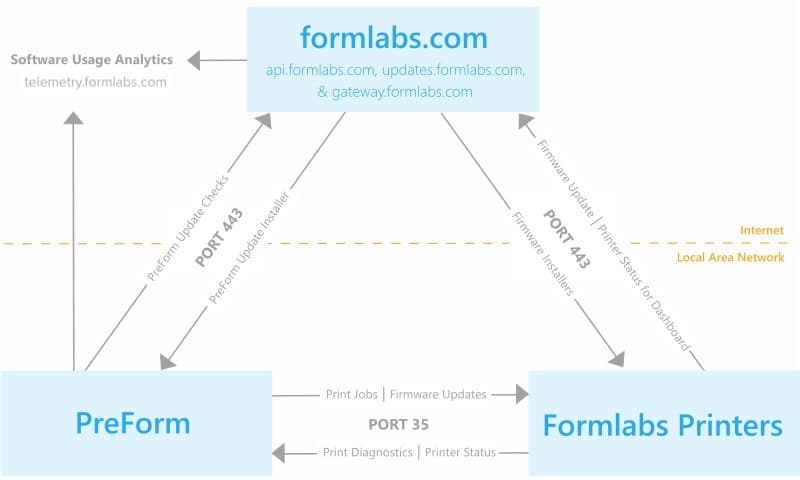
PreForm 和 Formlabs 硬件通过端口 443 (HTTPS)、api.formlabs.com 和 gateway.formlabs.com 与 Dashboard 进行通信。
安全
Formlabs 网站和 Dashboard 都使用 HTTPS URL,并使用行业标准的 256 位 RSA 加密进行加密。
Formlabs 使用 Amazon Web Services(亚马逊网络服务系统,AWS)存储数据。AWS 跨多个设备和多个环境控制设施储存冗余数据。AWS 基站和控件接受 SAS-70 II 类年审,且 AWS 信息安全管理流程和控件已获得 ISO 27001 认证。
请确保您的防火墙并未屏蔽这些服务器:
Formlabs 设备
连接
有三种方法可以将电脑与 Formlabs 设备连接。
如果通过触摸屏设置启用 Formlabs 设备,则该设备会发送性能数据(例如激光校准和打印成功率),以帮助我们排查问题并改进 Formlabs 硬件的功能。
安全性
Formlabs 硬件包含以下安全配置。
打印机通过 NTP(UDP 端口 123)与下列服务器同步时间。请确保您的防火墙并未屏蔽这些服务器:
其他安全注意事项和防火墙要求:
PreForm 桌面软件
Connectivity
PreForm operates in the same three connectivity modes as Formlabs devices: without network access, via LAN, and via LAN with internet access. For network connected printers, PreForm communicates through port 35 and checks for updates on updates.formlabs.com via port 443.
PreForm includes the option to participate in a software quality improvement project which logs information for Formlabs to improve PreForm. Choose whether to contribute to the quality improvement project by accessing Help > Help Improve PreForm... in the PreForm menu bar. To contribute, PreForm must operate on an internet-connected computer.
If you opt to participate in PreForm quality improvement, PreForm sends usage data to Formlabs at the URL telemetry.formlabs.com. You can opt to send anonymized crash and usage information, which does not include 3D model data or personal information. You can also opt to upload FORM files to help improve Formlabs products, which may include protected information. Opt out of FORM file collection if your files could contain protected health information or information subject to export controls.
PreForm logs and reports three major events:
New versions of printer firmware can be uploaded to the printer via PreForm. If PreForm is on an internet-connected computer, the software checks for new firmware via updates.formlabs.com. The specific URL for Form 2 firmware is updates.formlabs.com/latest/update-check-form-2-firmware-v2. The specific URL for PreForm updates is updates.formlabs.com/latest/update-check-preform-v2. If PreForm cannot connect to the internet, a new firmware version must be saved on a local disk and selected within PreForm in order to update.
Security
PreForm is distributed via a signed installer (for Windows) and signed app bundle (for Mac OS).
Please make sure not to block these on your firewall:
Automatic updates
PreForm uses the Omaha Updater Service to automatically update the software, ensuring that users receive the latest features, improvements, and security patches. The Omaha service operates in the background to streamline the update process, allowing you to stay on the most up-to-date version of PreForm without manual intervention.
As part of this process, PreForm will make requests to the following URLs for update verification and download:
These URLs are used by the Omaha service to check for available updates and securely download the latest version of PreForm when necessary. It is important that the software can connect to this service to ensure that updates are applied promptly.
For network administrators and those with strict firewall policies, please ensure that outbound connections to these URLs are allowed for PreForm to function correctly and receive automatic updates.
远程打印
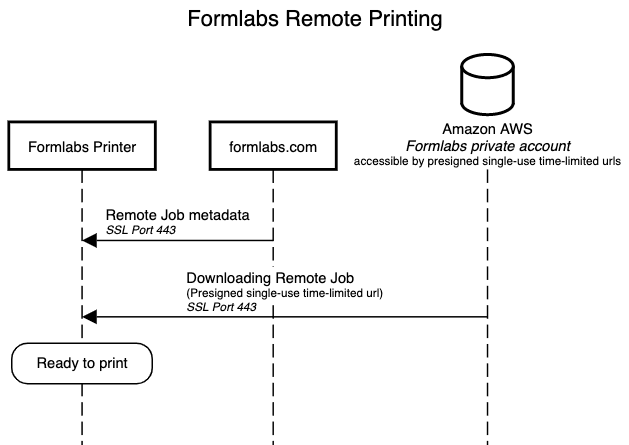
Formlabs 打印机能够将打印任务发送到不在同一网络中的打印机。
连接
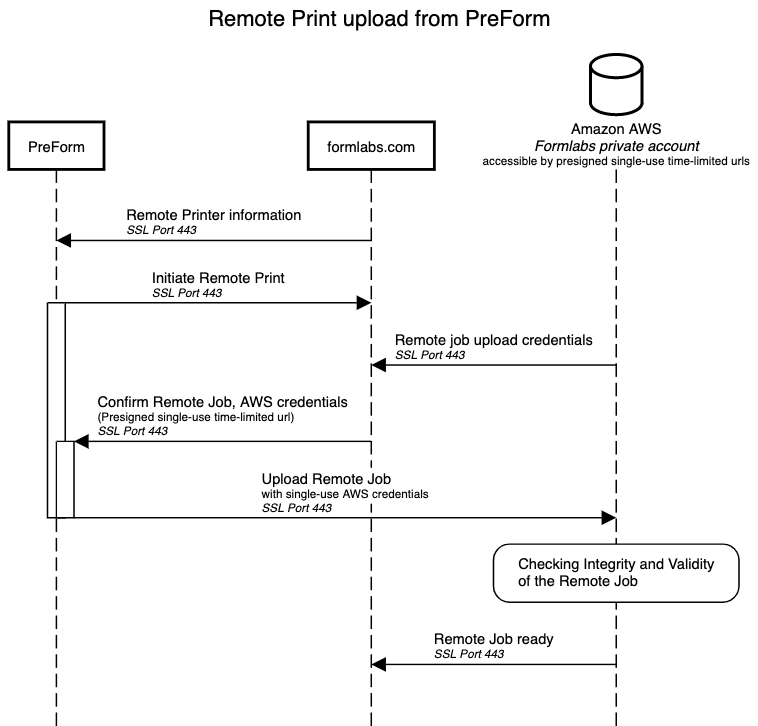
PreForm、Formlabs 打印机、Formlabs.com 和 Amazon Web Services (AWS) 服务器均通过端口 443 (HTTPS) 通信。
安全
所有远程打印任务都使用我们的专用 Formlabs AWS 帐户存储。在传输过程中,信息先通过 HTTPS SSL 进行加密,然后到达我们的专用帐户。上传和下载通过签名的一次性临时上传 URL 来保证安全。
请确保您的防火墙并未屏蔽这些服务器: