白皮书
Formlabs Logo

Form Cure L V1 error messages

Form Cure L V1 error messages

The Form Cure L V1 touchscreen displays error messages if the machine encounters any abnormalities and displays more details about the error.

诊断日志

The Form Cure L maintains diagnostic logs to provide detailed information about the machine’s functionality. Include these diagnostic logs with other relevant observations and details when contacting Formlabs Support or your authorized reseller to speed up resolution.

To upload diagnostic logs via PreForm:

  1. Open the latest version of PreForm.
  2. Click File > Accessories in the menu bar. The Accessory List window appears.
  3. Select the Form Cure L’s serial name. The Device Details window for the selected Form Cure L appears.
  4. Click Download Logs. A confirmation window appears.
  5. Click Browse to download the diagnostic logs to a preferred location on your computer.
  6. Click OK. The diagnostic logs save and appear in the encrypted FORMLOGS format.
  7. Attach the file when contacting Formlabs Support or your authorized reseller.

Device currently active

The Form Cure L displays the message The device is currently active when the machine attempts to start a post-curing cycle while a cycle is already in progress. Power cycle the machine by disconnecting and reconnecting the power.

Device state invalid

The message The device state is currently invalid indicates that a firmware error has occurred. Power cycle the machine by disconnecting and reconnecting the power. If you see this error message repeatedly, contact Formlabs Support or a authorized reseller.

Invalid duty cycle

The message The device's duty cycle is currently invalid indicates that a firmware error has occurred. Power cycle the machine by disconnecting and reconnecting the power. If you see this error message repeatedly, contact Formlabs Support or a authorized reseller.

Call to DBus failed

The message The call to DBus failed indicates that a firmware error has occurred. Power cycle the machine by disconnecting and reconnecting the power. If you see this error message repeatedly, contact Formlabs Support or a authorized reseller.

Invalid reply to DBus

The message The reply to the DBus was invalid indicates that a firmware error has occurred. Power cycle the machine by disconnecting and reconnecting the power. If you see this error message repeatedly, contact Formlabs Support or a authorized reseller.

Fan control failed

The message The fan control failed indicates that a firmware error has occurred. Power cycle the machine by disconnecting and reconnecting the power. If you see this error message repeatedly, contact Formlabs Support or a authorized reseller.

Timer expired

The Form Cure L displays the message The timer has expired when it does not receive temperature data for an extended period of time. Power cycle the machine by disconnecting and reconnecting the power.

Temperature fault

The Temperature fault occurred error indicates that the Form Cure L thermistor encountered a problem. Power cycle the machine by disconnecting and reconnecting the power. If that does not resolve the issue, disconnect the power. Remove the Form Cure L top shell and check that the thermistor wiring is secure. Contact Formlabs Support or a authorized reseller for more information.

LED brightness error

The Form Cure L displays the message The LED brightness encountered an error when the machine encounters an error while setting the brightness of the LEDs. Power cycle the machine by disconnecting and reconnecting the power. If that does not resolve the issue, unscrew each of the three LED modules (accessible from within the post-cure chamber) and check that their wiring is secure. Contact Formlabs Support or a authorized reseller for more information.

Set duty cycle failed

The Form Cure L displays the message The set duty cycle failed when the machine encounters an error while setting the brightness of the LEDs. Power cycle the machine by disconnecting and reconnecting the power. If that does not resolve the issue, unscrew each of the three LED modules (accessible from within the post-cure chamber) and check that their wiring is secure. Contact Formlabs Support or a authorized reseller for more information.

Set limit failed

The Form Cure L displays the message The set limit failed when the machine encounters an error while setting the current temperature limit. Power cycle the machine by disconnecting and reconnecting the power. If that does not resolve the issue, unscrew each of the three LED modules (accessible from within the post-cure chamber) and check that their wiring is secure. Contact Formlabs Support or a authorized reseller for more information.

Door open

If you try to start a post-cure cycle while the Form Cure L door is open, the machine displays the message The door is open. Please close. Close the machine door before proceeding.

Device failed to reach required temperature

The Form Cure L displays the message The device failed to reach the required temperature if it does not reach its target temperature within 30 minutes. To resolve this issue:

  1. Disconnect the Form Cure L from power.
  2. Remove the Form Cure L top shell, following the instructions in the guide Replacing the Form Cure L heater modules [EN] [DE] [ES] [FR] [IT] [JA] [ZH].
  3. Check that the thermistor and heater module wiring is secure.
  4. If the wiring is secure, the heater modules may need to be replaced. Replacement heater modules are available on the Formlabs Store. Follow the instructions in the guide linked above to replace the heaters.

Turntable error

The Form Cure L displays the message An error occurred with the device’s turntable if the turntable was unable to move properly due to an issue with the motor driver or the motor command. Power cycle the machine by disconnecting and reconnecting the power.

Board Not Operational error

The Form Cure L displays the message Board Not Operational Error if it encounters an issue with a device connected to the motherboard, such as a heater module or LED module fan. Download the machine’s diagnostic logs and send them to Formlabs Support for assistance identifying the faulty component.

Unknown error

The Form Cure L displays the message An unknown error occurred if it encounters some other unspecified issue. Power cycle the machine by disconnecting and reconnecting the power.

恢复出厂设置说明

A factory reset may correct unusual Form Cure L behavior. Unusual behavior may include unknown error messages, incomplete firmware updates, or an unresponsive touchscreen. A factory reset erases all custom settings and network connections.

Notice:

A factory reset erases all custom settings and diagnostic logs. Upload diagnostic logs before performing a factory reset.

To manually perform a factory reset:

  1. Unplug the Form Cure L.
  2. Reconnect the machine’s power cable.
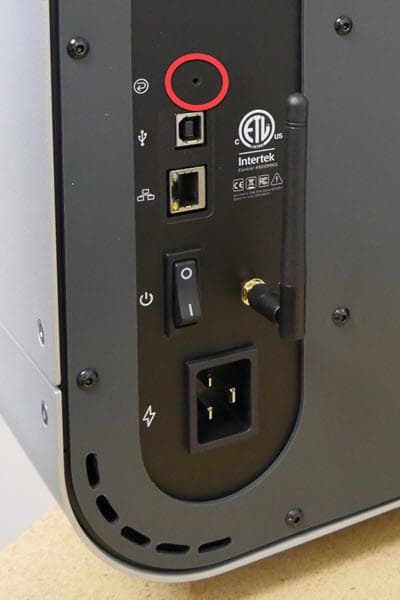
  3. When the Formlabs logo appears, push and hold the reset button located above the USB and Ethernet ports in the rear of the Cure L until Resetting to factory defaults appears on the touchscreen. You may need to use a paperclip or other small tool to push the reset button.
  4. Release the button.
  5. The touchscreen displays Factory reset complete before initializing the machine.
Close up of the rear of the Form Cure L; red circle highlighting Factory Reset button.