
白皮书
Fuse 1 generation error messages: Error 258, Error 261, Error 374
Fuse 1 generation error messages: Error 258, Error 261, Error 374
说明
如果温度读数出现问题,Fuse 1 代打印机的触摸屏会显示错误信息 Error 258(错误 258)、Error 261(错误 261)或 Error 374(错误 374),而这些问题很可能由传感器故障引起。
打印机和成型室中分别有三个 RTD(电阻温度检测器)传感器。如果出现温度感应问题,要么终止打印,要么关闭相关加热器以防止损坏打印机或成型室,但打印仍继续。
在固件版本 1.16.12 或更高版本中,如果空气加热器或上壁加热器等关键加热器的温度读数出现问题,Fuse 1 代打印机会以错误 258 或错误 261 终止打印。
如果非关键加热器的温度读数出现问题,相关加热器会被关闭,打印机的触摸屏会显示 Error 374(错误 374),但打印仍继续。这可能会导致打印部件的表面质量变差,机械性能下降。
Fuse 1 代打印机的场地要求
表现
- 错误 258、错误 261 或错误 374 错误信息
- 错误 258:PR_ERROR_SENSOR_READ
- 错误 261:PR_ERROR_SENSOR_TEMPERATURE_ABOVE_LIMIT
- 错误 374:PR_ERROR_NOT_CRITICAL_SENSOR_FAULT
常见原因
- 温度传感器故障
- 成型室和打印机之间的电气接触不足
- 电气噪声干扰温度传感器
故障排查步骤
- 将打印机的固件更新为版本 1.16.12 或更高版本。
- 温度传感器错误信息子代码详细说明了出现故障的传感器。您还可以通过 PreForm 下载打印机的错误历史记录。
| Error 258 Error 261 | Error 374 |
|---|---|
|
|
- 关闭打印机电源,并再次尝试打印。
- 如果错误为间歇性,请确认 Fuse 1 代打印机是否符合现场要求。
- 如果错误持续存在,请继续。
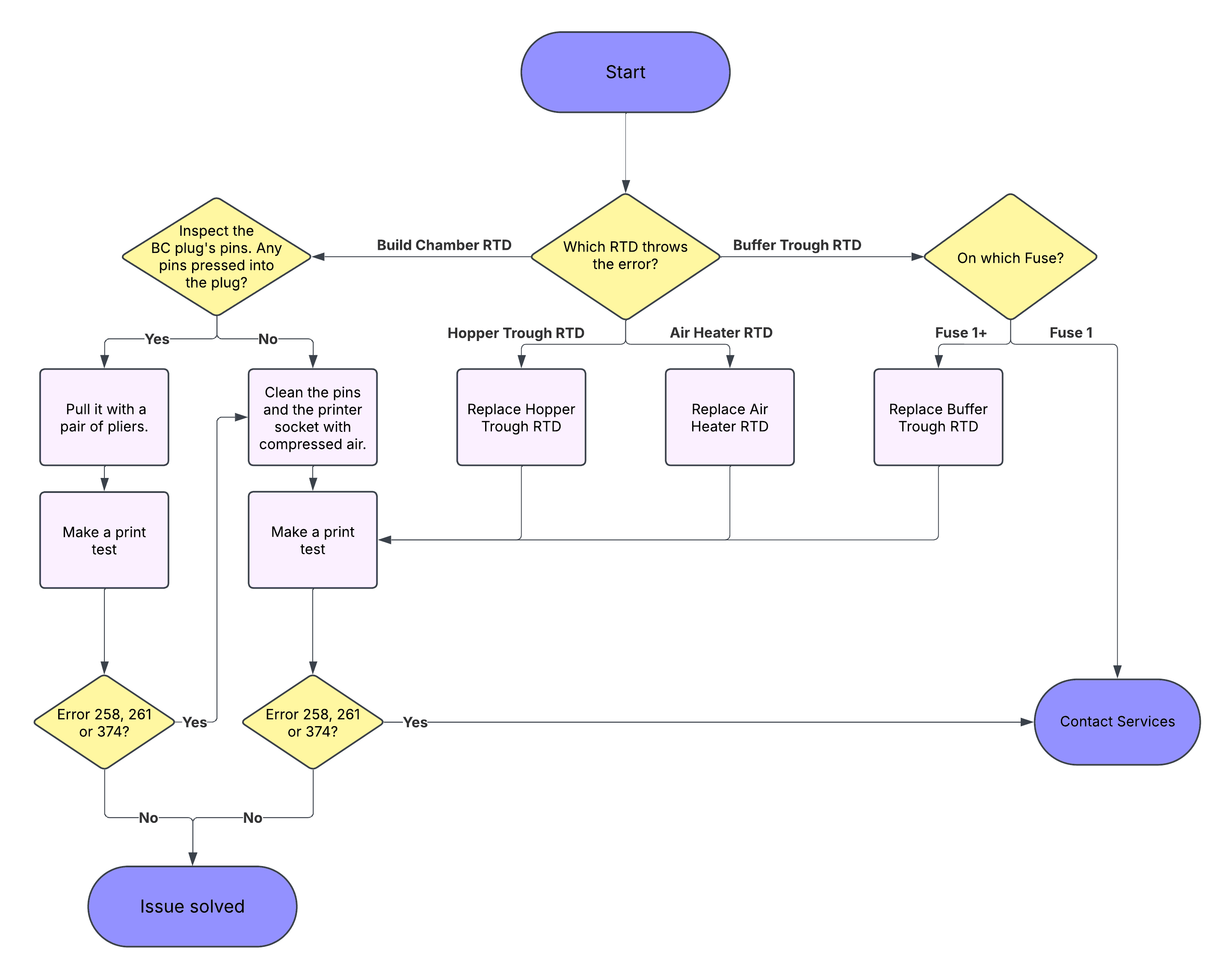
- 如果错误信息表明空气加热器、缓冲槽或料斗槽出现问题,请联系 Formlabs Support 或您的授权经销商,以协助您维修或更换受影响的部件。
- 如果错误信息显示成型室存在问题,按下成型室插头上的黑色塑料板,露出所有插头插针。
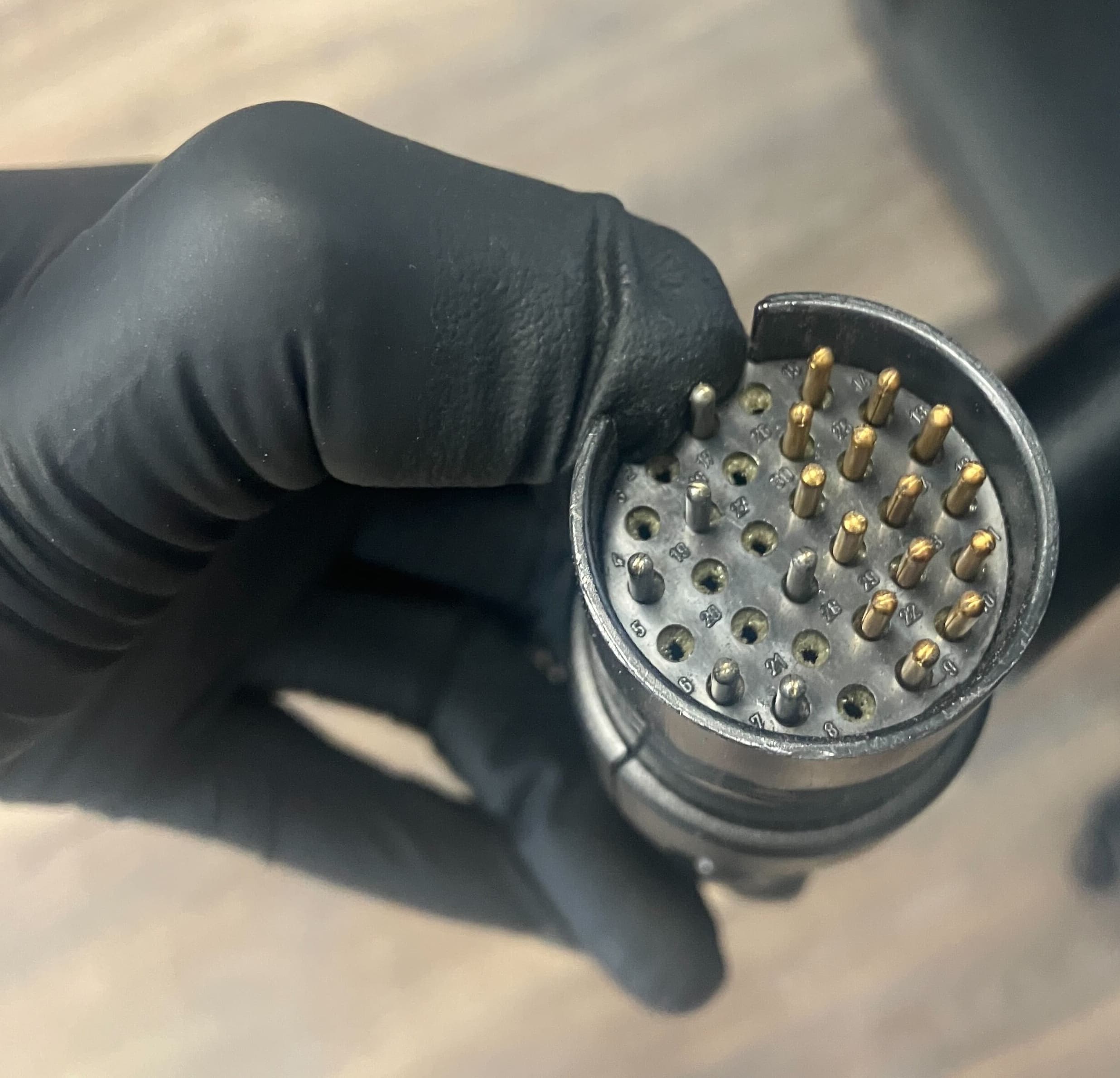
- If a pin sinks into the plug, gently pull it with a pair of pliers.
- Clean the build chamber plug’s pins and the printer socket with contact cleaner or compressed air. Ensure the plug is being inserted until there is an audible ‘click’ and the plug handle sits flush with the printer enclosure.
- If the pin does not remain in place, or is bent or broken, forward a picture of the pins to Formlabs Support or your authorized reseller for assistance in replacing the affected build chamber.
- If multiple build chambers trigger the error, and the troubleshooting steps above do not resolve the error, please contact Formlabs Support or your authorized reseller for assistance.