

Form Wash V2 故障排查
Form Wash V2 故障排查
如果 Form Wash V2 出现任何异常,触摸屏会显示错误信息和有关错误的更多详细信息。按照故障排查步骤解决 Form Wash 上的常见错误代码。如果遇到本文中未提及的错误代码,请参阅下文中的一般故障排查步骤。
一般故障排查步骤
The following steps are recommended for most issues seen on the Form Wash:
- Common steps for bugs, software issues, and electrical issues:
- Ensure that your unit’s firmware is up to date.
- Power cycle the unit using the switch on the rear of the machine. Leave the unit powered off for at least 30 seconds before powering back on.
- If an issue persists and the unit’s firmware is already up to date, manually reinstall the latest firmware package.
- If an issue began immediately after updating the unit’s firmware, roll back the firmware package to the previous version.
- Best practices for opening a support case with Formlabs Support:
- Provide photos of the error code and any other symptoms you are seeing, including videos of the following:
- entire unit
- areas near the tower
- down into the Wash Bucket
- Note the context of the issue (e.g., did the issue occur immediately after installation, after a software update, etc.).
- Note the frequency of this issue and whether it is persistent or intermittent.
- Note all troubleshooting steps already attempted.
错误信息:马达卡住
Motors Jammed(马达卡住)。解决此问题的方法:
- 拔掉设备插头,手动将升降装置升至最大高度。
- 升降装置升起后,将设备插头插回。
- 取出清洗桶。
- 重新放入清洗桶。确保内盖在盖子铰链附近的插片下滑动。
- 向下按动内盖的边缘,使盖子与清洗桶齐平。
- 重新放入清洗桶。确保内盖与清洗桶齐平。
如果重新放置清洗桶无法解决问题,请联系 Formlabs Support 或您的 授权经销商。
叶轮发出异常噪音
如果清洗桶没有正确对准 Form Wash 底座,混合器可能会在周期中产生共振或发出其他异常噪音。这些噪音通常可以通过将清洗桶相对于底座轻轻向前滑动来解决。
If repositioning the wash bucket does not resolve the issue, replace the impeller. Form Wash V2 impellers are available for purchase on the Formlabs Store. Follow the guide Replacing the Form Wash V2 impeller to replace the component.
If the issue persists, contact Formlabs Support or your authorized reseller.
清洗篮在移动时碰撞内盖
如果外盖和内盖的组件错位,清洗篮在升起或降下时可能会与内盖发生碰撞。如果清洗篮多次与内盖碰撞,Formlabs 建议将升降装置折弯,以防止碰撞。
解决此问题:
- 点击 Raise(升高),将升降装置升至最大高度。
- 用一只手支撑塔架,将清洗篮支架推向塔架。金属轻微弯曲。
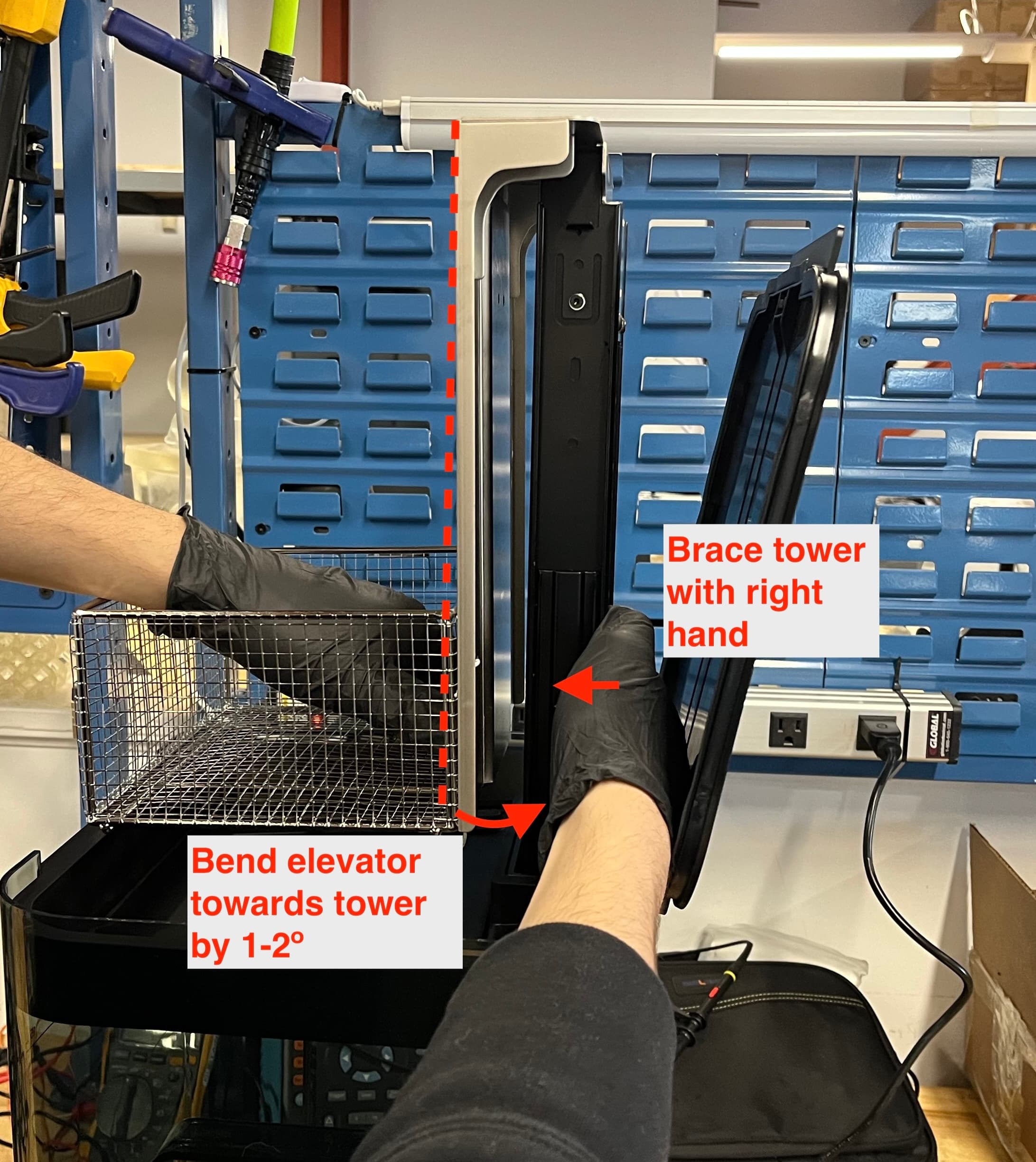
- 点击 Lower(降低)。检查确保清洗篮可以上下移动且不会与内盖相撞。
- 如果清洗篮继续与内盖碰撞,请重复步骤 1-3。
如果问题仍然存在,请联系 Formlabs Support 或您的 授权经销商。
构建平台支架臂安装不当
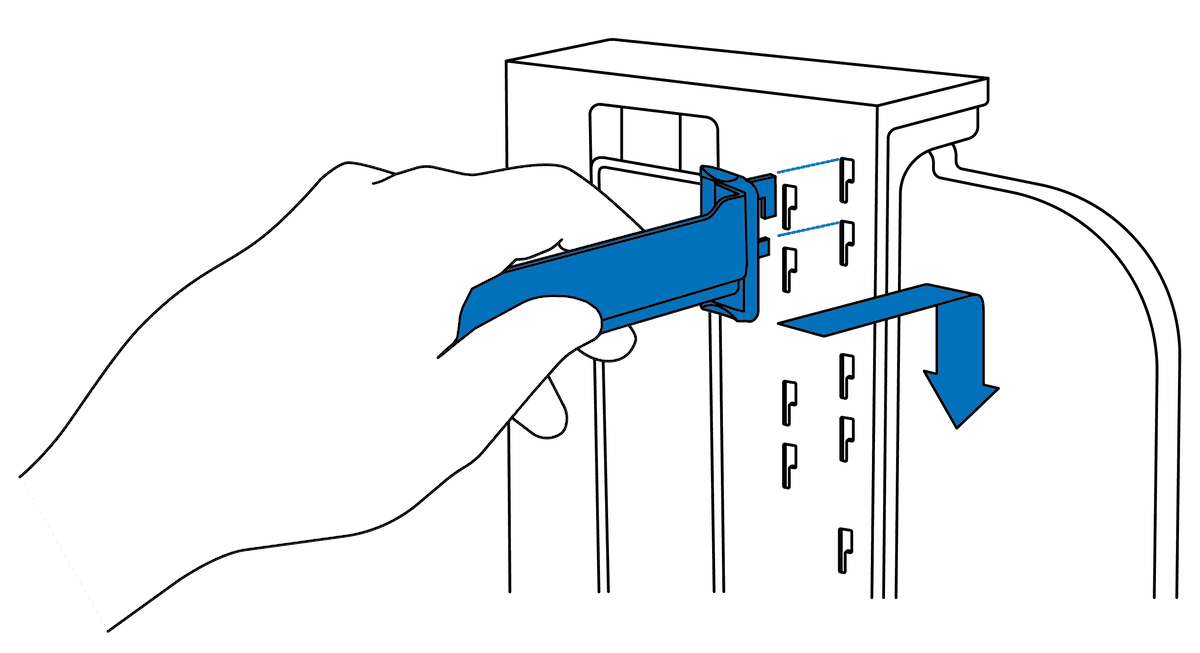
构建平台升降臂应能轻松地插入其插槽。如果不能,则可能需要更换支撑臂。可在 Formlabs 商店购买构建平台支架臂替换件。如果支架无法正确安装在新的 Form Wash 上,请联系 Formlabs Support 或您的 授权经销商。
外盖垫圈导致 Form Wash 无法关闭
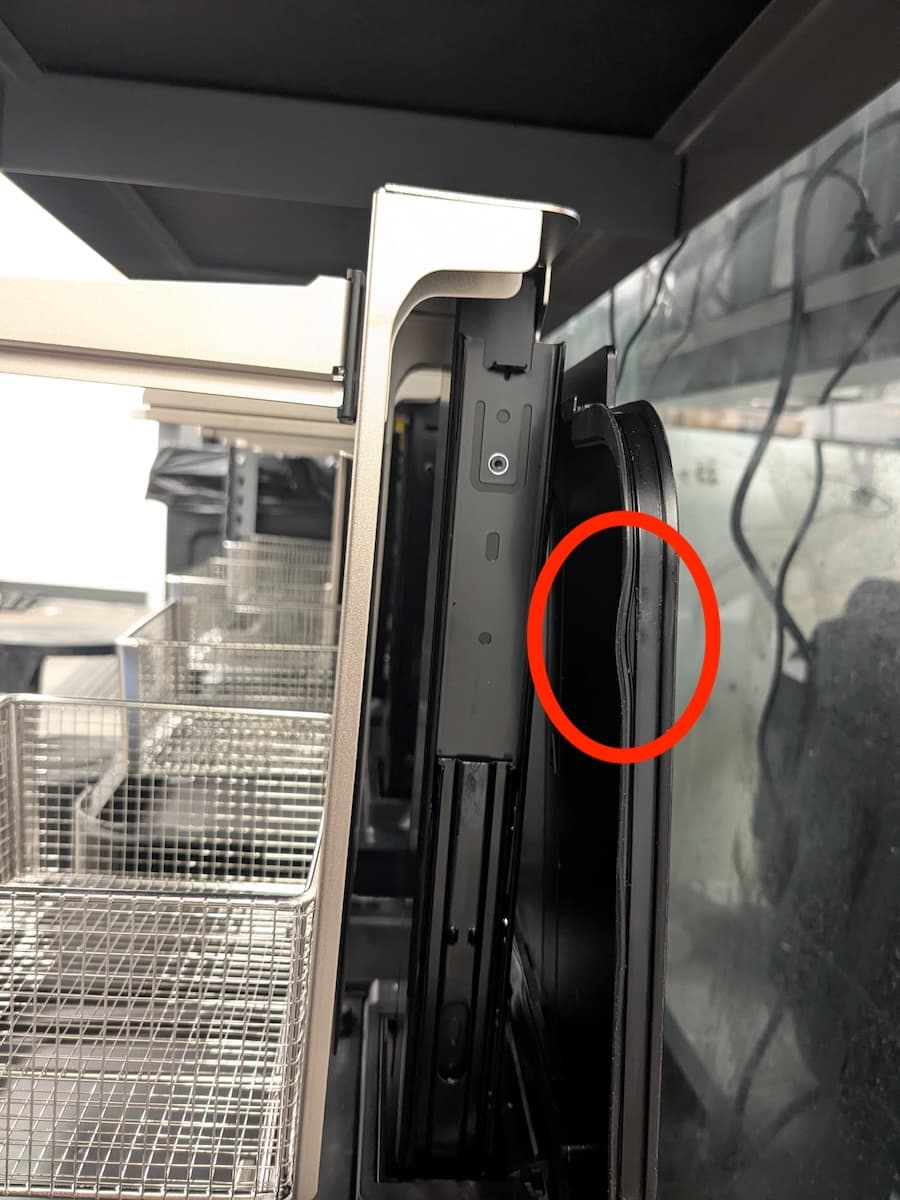
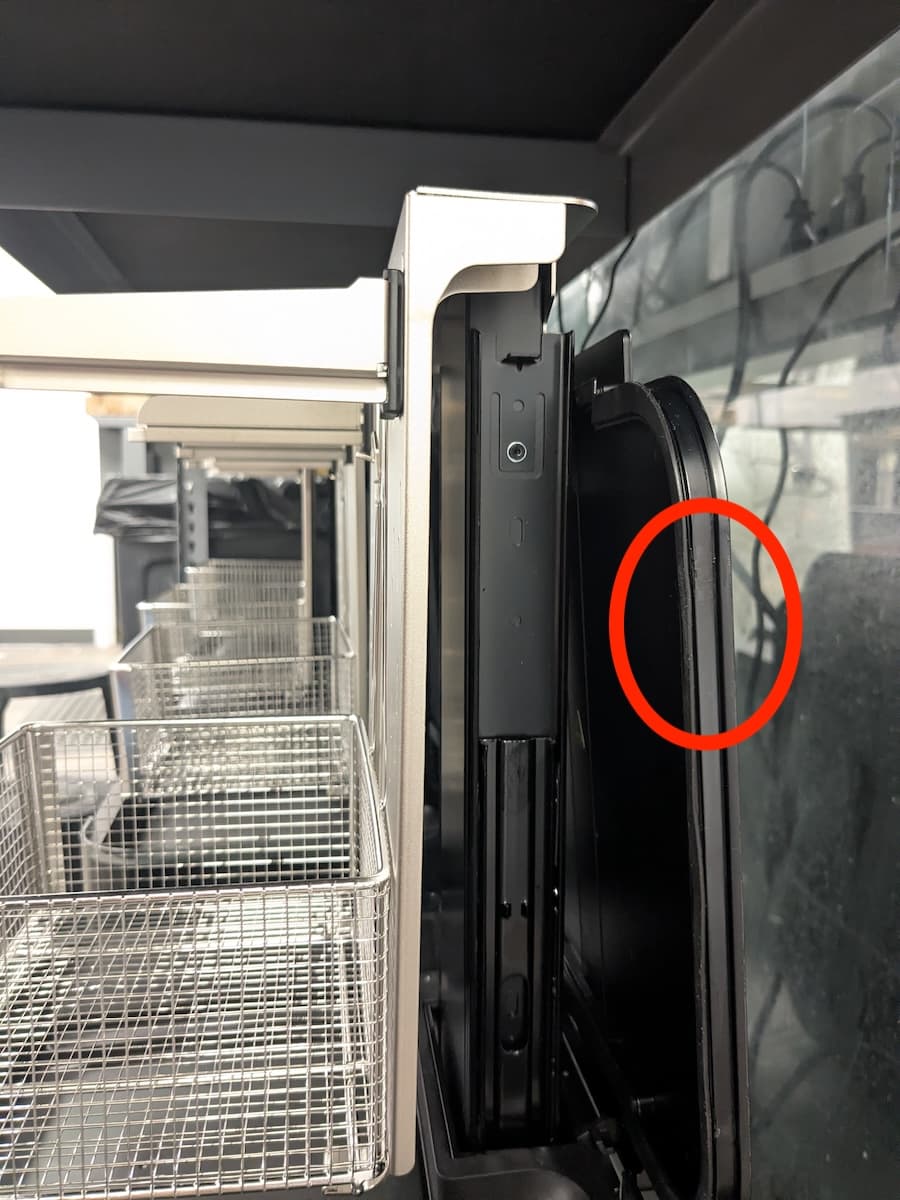
Form Wash V2 的外盖上有一个垫圈,有助于将其与清洗桶密封,减缓溶剂的挥发速度。如果垫圈脱落,外盖可能无法完全关闭。为了解决这个问题,请将垫圈推回到位。如果垫圈损坏或未固定到位,请更换外盖组件。可在 Formlabs 商店购买外盖替换件。
叶轮不旋转
The Form Wash removes uncured resin from the surface of printed parts by simultaneously soaking and moving them in a solvent with an impeller at the bottom of the wash bucket. If the impeller does not spin, your printed parts will not be cleaned effectively. To fix an impeller that no longer spins:
- Check the other functions of the Form Wash. If the Form Wash does not respond to menu selections, replace the display and control knob assembly. The part is available for purchase on the Formlabs Store.
- Start a new wash cycle, wait for the elevator to lower, then listen for the impeller motor.
- If you can hear the impeller motor moving but the impeller itself does not spin, check that the impeller is mounted properly within the wash bucket. Follow the instructions in the guide on replacing the impeller.
- If the impeller is damaged and cannot be remounted, replace the impeller.
- If the mount in the wash bucket is damaged, replace the wash bucket.
- If you cannot hear the motor spinning, the unit may need to be replaced. Contact Formlabs Support or your authorized reseller.
升降板生锈
Form Wash V2 含有多种金属部件,长时间接触水后会生锈。如果在设备中注入水(例如,在使用 TPM 清洁部件时用作二次冲洗),就会发生这种情况,但低纯度 IPA 中的含水量也会导致生锈。锈蚀会导致升降板无法正常移动,或脱落到清洗溶剂中,污染打印部件。
如果发现 Form Wash V2 升降板生锈:
- 更换升降板。可在 Formlabs 商店购买 Form Wash V2 升降板替换件。如果设备仍在保修期内,请联系 Formlabs Support 或 授权经销商。
- 更换清洗溶剂。请勿向 Form Wash V2 中注水。如果使用的是低纯度 IPA,请考虑用高纯度溶剂替换。