白皮书
Formlabs Logo

Fuse 1 generation motor movement errors (Error 90, 93, 94, and 95)

Fuse 1 generation motor movement errors (Error 90, 93, 94, and 95)

Fuse 1 代打印机马达概览

每台 Fuse 1 代打印机都有五个马达,分别驱动以下组件:

  1. 料斗翻转板(在打印平面右侧,靠近粉末料斗处)
  2. 缓冲器翻转板(在打印平面左侧,粉末料斗对面)
  3. 重涂机
  4. Z 轴驱动器(驱动成型室打印床上下移动;在错误代码中标记为圆柱
  5. 给料器

虽然不同组件的实际硬件可能不同,但每个马达都具有相同的基本功能设置:

  • 编码器板,用于测量马达(或部件)与某个设定“零”位置的相对位置。其工作原理是测量马达轴上磁铁的极性。
  • 对于马达或组件上的磁铁,位置由编码器板测量。
  • 驱动组件的步进马达。
  • 一组将马达与组件耦合的特征,将马达的旋转转化为被驱动组件的运动。

提示:

可在 Formlabs 商店购买 Fuse 1 代马达组件。如果需要更换马达以便进行故障排查,请联系 Formlabs Support认证服务提供商以获取帮助。

大型马达装配:翻转板和重涂机

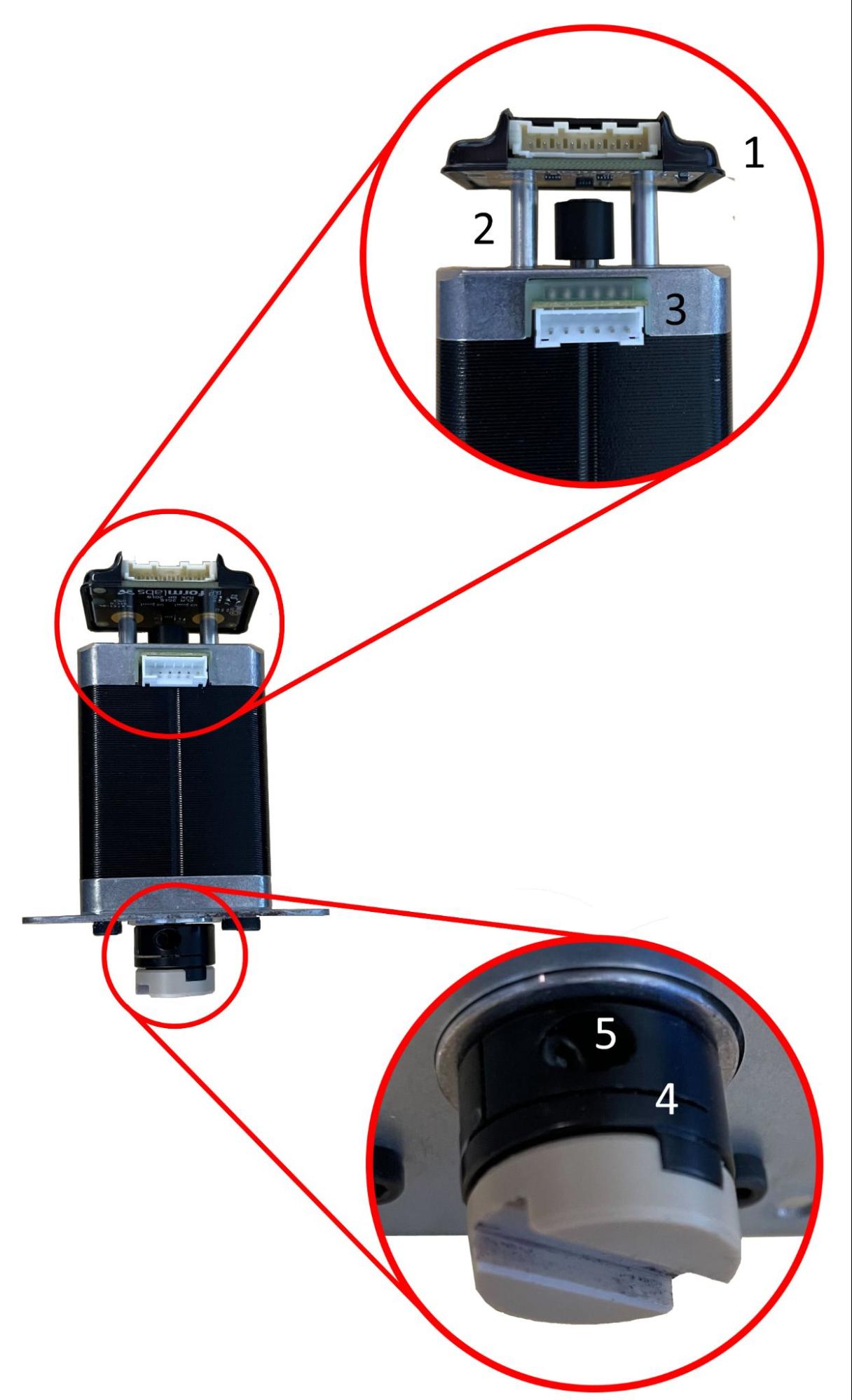
翻转板和重涂机由相同的马达组件驱动,如下显示。

这些马达具有:
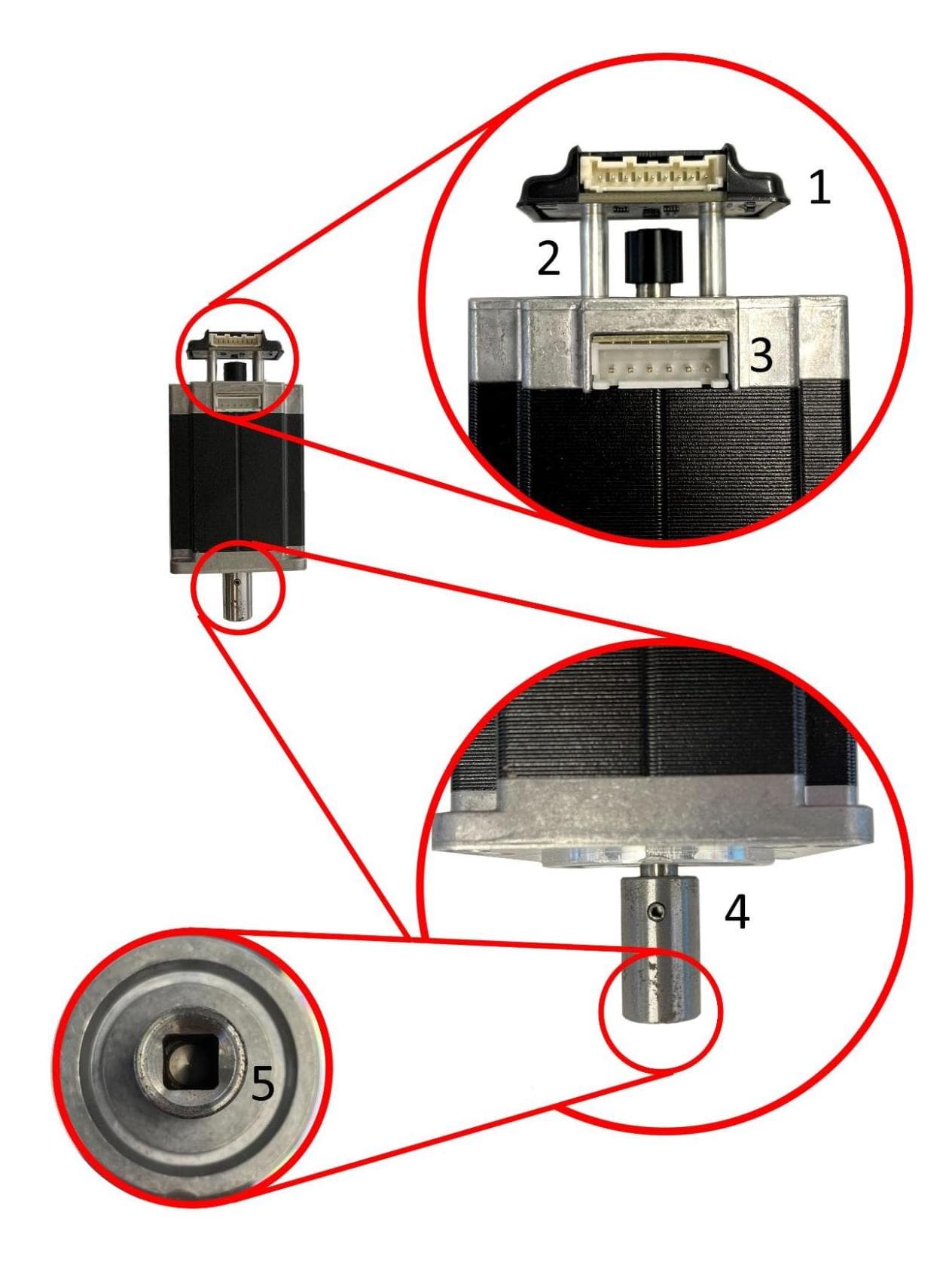
  1. 安装在马达轴末端后的编码器板
  2. 马达轴末端的磁铁
  3. 步进马达(大于打印机中的其他马达)
  4. 将联轴器固定在马达轴上的弹簧销
  5. 将马达固定在其所驱动组件的方轴上的联轴器
Fuse 1 代翻转板和重涂机马达组件

Z 轴驱动马达

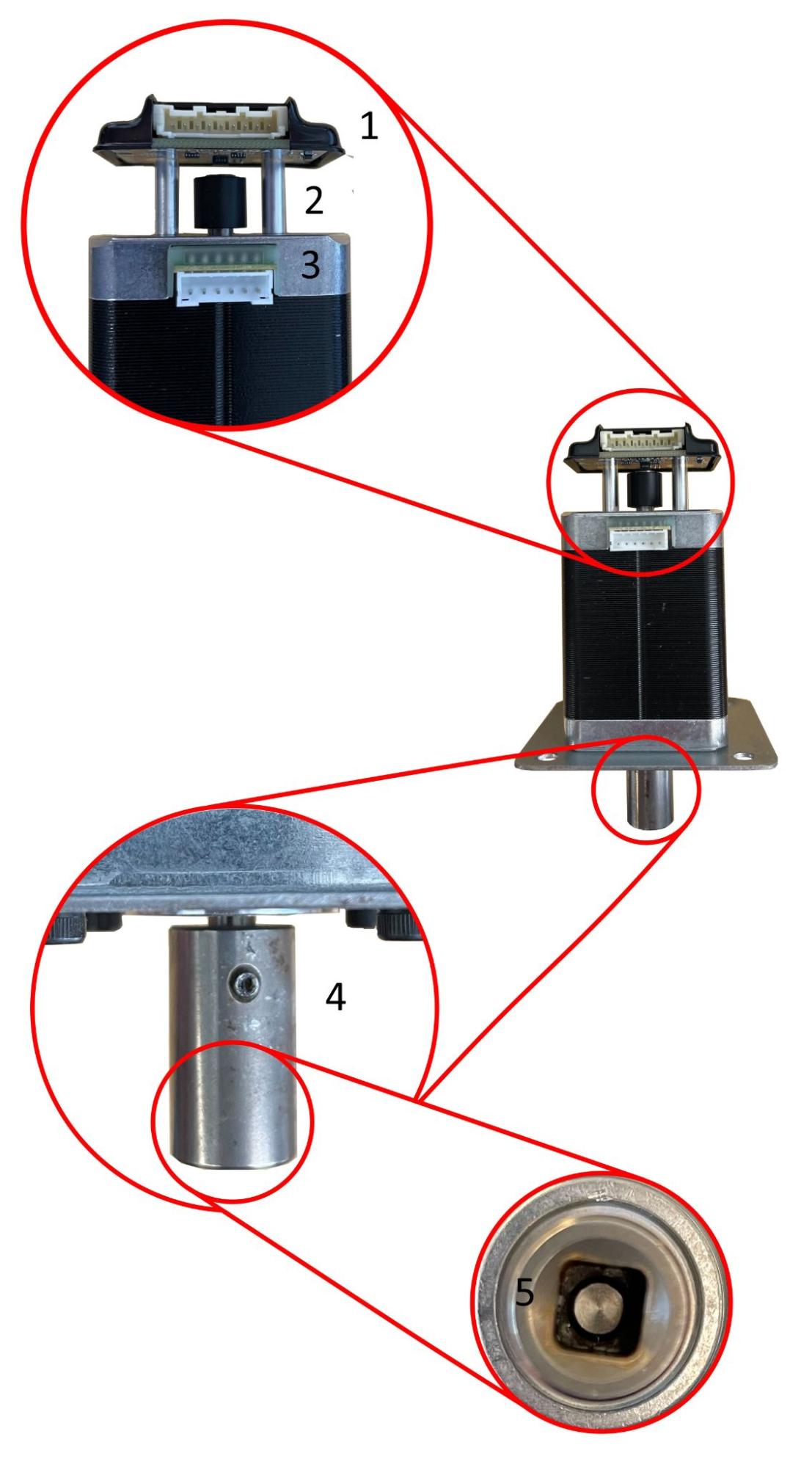
Z 轴驱动马达有两种类型:一种安装在大多数 Fuse 1 设备中,另一种安装在新型 Fuse 1 设备和所有 Fuse 1+ 30W 设备中。

早期型号 Fuse 1 Z 轴驱动马达组件新型 Fuse 1 和 Fuse 1+ 30W Z 轴驱动马达组件
Early model Fuse 1 Z-drive motor assemblyLate model Fuse 1 and Fuse 1+ 30W Z-drive motor assembly

这些马达具有:

  1. 安装在马达轴末端后面的编码器板
  2. 马达轴末端的磁铁
  3. 步进马达(比重涂机/翻转板马达小)
  4. 固定在马达轴上的滑块联轴器
  5. 将滑块联轴器固定在马达轴上的固定螺丝

这些马达具有:

  1. 安装在马达轴末端后的编码器板
  2. 马达轴末端的磁铁
  3. 步进马达(小于重涂机/翻转板马达)
  4. 将联轴器固定在马达轴上的弹簧销
  5. 将马达固定在 Z 轴驱动装置方轴上的联轴器

给料器马达

给料器由一个较小的马达驱动,马达轴上连接有链轮,链轮用于驱动连接在给料器滚筒轴上的链条。与 Fuse 1 和 Fuse 1+ 30W 中的所有其他马达不同,编码器板磁铁连接在组件的轴上,而不是马达轴上。
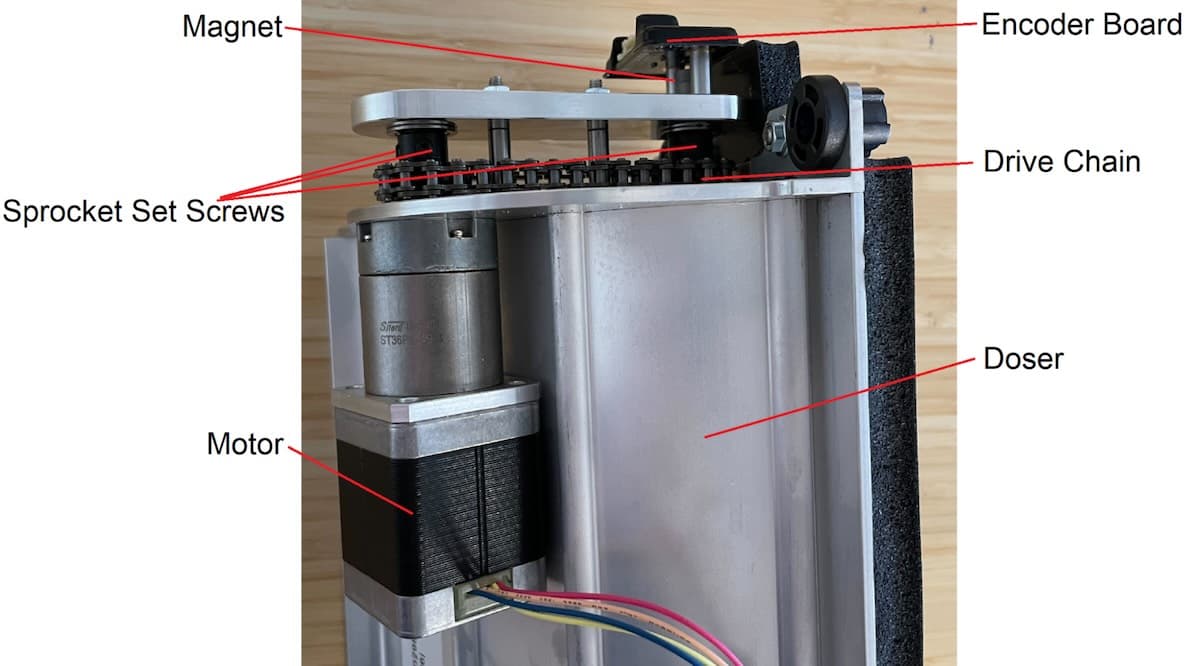
Fuse 1 代给料器马达组件

错误

Fuse 1 代打印机上与马达移动有关的主要错误代码如下:

  • 错误 90/1–5 PR_ERROR_MOTORS_UNEXPECTED__[组件]:马达返回了打印机无法预料的响应。这通常是瞬时固件错误(如搅动或操作超时)导致的一次性错误。如果编码器板无法正常运行或已断开连接,也会出现此错误。
  • Error 93/1–5 PR_ERROR_MOTORS_MOVE_DEVIATION__[Component]:马达无法按预期量移动,一般是因为组件与某物发生碰撞。
  • Error 94/3, 94/4 PR_ERROR_MOTORS_MOVE_MISSED_HARDSTOP__[Component]:马达能够旋转很长时间,组件并未按预期与急停点碰撞。
  • Error 95/1–5 PR_ERROR_MOTORS_MOVE_MISSED_INDEX__[Component]:打印机试图将马达重新归位,但编码器板未检测到马达到达其原位。

错误代码后跟子代码,用于标记报告错误的马达。例如,错误 93/4 对应 PR_ERROR_MOTORS_MOVE_DEVIATION__CYLINDER,表示 Z 轴驱动马达移动偏离预期。这些子代码的编号对应于上述列表。

Error 90/1-5 PR_ERROR_MOTORS_UNEXPECTED

Error 90(错误 90)表示在处理来自特定马达编码器板的信息时出现问题。因此,所有马达故障排查步骤均相同,因为所用编码器板相同。

表现

  • 打印前或打印过程中出现错误代码
  • 组件无法正确归位
  • 通过 Motor Moves(马达动作)界面发出指令时组件不移动
  • 组件移动时发出吱吱嘎嘎/滴答声

原因

出现此错误信息的可能原因按可能性大小大致排序如下:

  • 软件漏洞
  • 编码器电路板故障/失灵/已断开连接
  • 控制板故障/失灵(Fuse 1 或 Fuse 1+ 30W MoTempBo)
  • 马达故障/失灵
  • 电气噪声

故障排查步骤

如上所述,由于所有马达使用相同的编码器板,因此故障排查步骤相同。

  1. 确保打印机的固件为最新版本。如果不是,请更新固件。
  2. 重启打印机。
  3. 如果问题持续存在,可能是编码器板断开或出现故障。
    1. 重新安装相关马达上的编码器板。
    2. 如果问题仍然存在,请更换受影响的马达组件,其中包括编码器板。

可在 Formlabs 商店购买 Fuse 1 代马达组件。请联系 Formlabs Support认证服务提供商以获取帮助。

错误 93 概览

错误 93 表示相关组件无法按预期量移动,一般是因为组件与某物发生碰撞。造成这些错误的主要原因是打印失败产生的碎屑卡住了组件,或者另一个组件停在了错误的位置,导致原组件与之相碰撞。也可能是因为编码器板故障或编码器数据处理不当。

原因

出现此错误信息的可能原因按可能性大小大致排序如下:

  • 上次打印失败产生的碎屑卡住组件
  • 另一个组件停错位置,导致碰撞
  • 编码器板故障
  • 编码器数据处理不佳或其他软件漏洞
  • 清空料斗例程有关的软件漏洞(仅限错误 93/1)
  • 错误插入成型室(仅限错误 93/4)
  • 周边熔化(上缸壁热电阻/加热器故障)(仅限错误 93/4)

表现

  • 打印前或打印过程中出现错误代码
  • 组件无法正确归位
  • 通过Motor Moves(马达动作)界面发出指令时组件不移动
  • 组件移动时发出吱吱嘎嘎/滴答声

Error 93/1 PR_ERROR_MOTORS_MOVE_DEVIATION__HOPPER_FLIPPER

错误 93/1 表示料斗翻转板马达移动偏离预期,翻转板无法移动预期量。

提示:

错误 93/1 通常由碎屑引起。在尝试任何其他故障排查步骤之前,彻底检查并清理料斗槽和料斗翻转板周围的区域。

  1. Error 93/1 can occur when running the Empty Hopper routine through the printer touchscreen. In these cases, retry the routine.
  2. Confirm the printer’s firmware is up to date. If it is not, update the firmware.
  3. Open the printer door and inspect the hopper flipper area, to the right of the print plane.
    1. If there is debris in the hopper side powder trough, proceed to step 3.
    2. If the recoater is directly above the flipper, proceed to step 4.
    3. If the hopper flipper appears to have nothing impeding it, proceed to step 5.
  4. In the Motor Moves menu, rotate the hopper flipper away from the debris and clean out any debris found.
  1. This failure mode generally happens after another print failure, usually a PrinterWatcher failure such as Error 112. Check the printer’s history to determine whether this may be the case.
    1. Find the Event UUID alphanumeric code corresponding to the error.
    2. Navigate to the PrinterWatcherFrames folder and locate the folder with the Event UUID you just found.
    3. Review the last ten frames provided by the PrinterWatcher before the error occurred for any debris.
  2. If debris is blocking the hopper flipper, inspect the print area and all moving components for other debris.
  3. If the motor does not rotate when activated in the Motor Moves menu and the debris cannot be accessed without moving the flipper, try moving the flipper manually.
    1. Power off the printer and allow it to cool to room temperature.
    2. Try moving the flipper manually. When powered off, the motor holds no torque and should not resist movement.
  4. In some cases, the debris may be stuck to the hopper trough, preventing the flipper from rotating in both directions. In this case, it may be necessary to apply heat to the melted powder with a heat gun.
    1. Vacuum any unsintered powder prior to applying heat to the debris in the powder trough.
    2. Always wear a respirator when applying heat to SLS powders and only attempt in a well-ventilated area.
  5. If the recoater is directly above the hopper flipper after an error, the recoater motor coupling has likely been damaged. If so, you may need to replace the recoater motor assembly.
  1. When this error is caused by a collision with the recoater, it often occurs several minutes after the start of a print, the first point at which the hopper flipper moves after the recoater has moved to the hopper side of the printer.
  2. Check the recoater motor coupling for damage by removing the motor and feeling the coupler for play. Follow the repair guide Replacing the Fuse 1 generation recoater motor assembly [EN] until you have removed the recoater motor and can access the recoater motor coupler. The coupler should be secured tightly to the motor shaft and should have little to no play.
    1. If the recoater motor coupling is damaged, the motor may need to be replaced. Fuse 1 generation recoater motors are available for purchase on the Formlabs Store. The recoater motor does not have a calibrated home position, so this motor can be removed and replaced without requiring calibration.
  1. In the Motor Moves menu, home the doser, then rotate the hopper flipper to confirm that it can travel a full 360° and homes to the correct place every time. If you do not home the doser first, the hopper flipper may collide with it, making it more difficult to diagnose the issue.
    1. If the flipper doesn’t move and makes an audible clicking sound, or if it appears to hit an obstruction in the powder trough, there is likely debris in the powder trough that is not visible. Refer back to step 3.
    2. Take a video of the flipper’s rotation for at least 2–3 full turns to look for any unusual or unexpected behavior.
    3. If the hopper flipper does not turn smoothly, the encoder board may be malfunctioning.
      1. Reseat the cable on the hopper flipper motor encoder board.
      2. If reseating the cable does not resolve the issue, you may need to replace the hopper flipper motor assembly. Fuse 1 generation flipper motors are available for purchase on the Formlabs Store.
    4. If the hopper flipper turns smoothly but does not home to the right position, then it has lost its calibrated home position. Contact Formlabs Support or a certified service provider for assistance.
      1. If the issue returns after recalibration, the hopper flipper motor assembly may need to be replaced. Fuse 1 generation flipper motors are available for purchase on the Formlabs Store.
  2. If the motor is colliding with something not previously mentioned, or if the issue cannot be reproduced by moving the motors manually, contact Formlabs Support or a certified service provider for assistance.
  1. Motor Moves(马达动作)菜单中,使给料器归位,然后转动料斗翻转板,确认其可以 360° 充分移动,并且每次都能正确归位。如果不先将给料器归位,料斗翻转板可能会与其发生碰撞,从而增加问题诊断难度。
    1. 如果翻转板不移动并发出滴答声,或者似乎撞到了粉末槽中的障碍物,那么粉末槽中很可能存在看不到的碎屑。返回第 3 步。
    2. 拍摄翻转板转动的视频,至少要转动 2-3 圈,查看是否有任何异常或意外行为。
    3. 如果料斗翻转板转动不顺畅,编码器板可能出现故障。
      • 重新安装料斗翻转板马达编码器板上的电缆。
      • 如果重新更换电缆仍不能解决问题,则可能需要更换料斗翻转板马达组件。可在 Formlabs 商店购买 Fuse 1 代翻转板马达。
    4. 如果料斗翻转板顺畅转动,但未归位到正确位置,则说明经校准的原位已丢失。请联系 Formlabs Support认证服务提供商以获取帮助。
      • 如果重新校准后问题再次出现,则可能需要更换料斗翻转板马达组件。可在 Formlabs 商店购买 Fuse 1 代翻转板马达。
  2. 如果马达与之前未提及的物体发生碰撞,或者通过手动移动马达无法重现问题,请联系 Formlabs Support认证服务提供商获取帮助。

Error 93/2 PR_ERROR_MOTORS_MOVE_DEVIATION__BUFFER_FLIPPER

Error 93/2 indicates that the buffer flipper motor deviated from the expected movement and the flipper was not able to move the expected amount.

Troubleshooting steps

  1. 这种失败模式一般发生在另一次打印失败之后,通常是 PrinterWatcher 故障,如错误 112。检查打印机的历史记录,以确定是否存在这种情况。
    1. 查找与错误相对应的事件 UUID 字母数字代码。
    2. 导览至 PrinterWatcherFrames 文件夹,定位带有刚刚找到的事件 UUID 的文件夹。
    3. 查看 PrinterWatcher 提供的在错误发生前记录的最后十帧图像,检查是否存在碎屑。
  2. 如果碎屑堵塞了缓冲器翻转板,请检查打印区域和所有移动组件是否存在其他碎屑。
  3. 如果在 Motor Moves(马达动作)菜单中激活后马达不旋转,且不移动翻转板就无法清理碎屑,请尝试手动移动翻转板。
    1. 关闭打印机电源,使其冷却至室温。
    2. 尝试手动移动翻转板。断电时,马达无扭矩,也不会抵抗移动。
  4. 在某些情况下,碎屑可能会粘在缓冲器槽上,导致翻转板无法双向旋转。在这种情况下,可能需要用热风枪对熔化的粉末进行加热。
    1. 在对粉末槽中的碎屑进行加热之前,用真空装置吸除未烧结的粉末。
    2. 在对 SLS 粉末进行加热时,务必要佩戴呼吸器,并且只能在通风良好的地方尝试。
  1. If the recoater is directly above the buffer flipper after an error, the recoater motor coupling has likely been damaged. If so, you may need to replace the recoater motor assembly.
  1. When this error is caused by a collision with the recoater, it often occurs several minutes after the start of a print, the first point at which the hopper flipper moves after the recoater has moved to the hopper side of the printer.
  2. Check the recoater motor coupling for damage by removing the motor and feeling the coupler for play. Follow the repair guide Replacing the Fuse 1 generation recoater motor assembly [EN] until you have removed the recoater motor and can access the recoater motor coupler. The coupler should be secured tightly to the motor shaft and should have little to no play.
  3. If the recoater motor coupling is damaged, the motor may need to be replaced. Fuse 1 generation recoater motors are available for purchase on the Formlabs Store. The recoater motor does not have a calibrated home position, so this motor can be removed and replaced without requiring calibration.
  1. Motor Moves(马达动作)菜单中,转动料斗翻转板,确认其可以 360° 充分移动,并且每次都能正确归位。
    1. 如果翻转板不移动并发出滴答声,或者似乎撞到了粉末槽中的障碍物,那么粉末槽中很可能存在看不到的碎屑。返回第 3 步。
    2. 拍摄翻转板转动的视频,至少要转动 2-3 圈,查看是否有任何异常或意外行为。
    3. 如果缓冲器翻转板转动不顺畅,编码器板可能出现故障。
      1. 重新安装料斗翻转板马达编码器板上的电缆。
      2. 如果重新更换电缆仍不能解决问题,则可能需要更换料斗翻转板马达组件。可在 Formlabs 商店购买 Fuse 1 代翻转板马达。
    4. 如果缓冲器翻转板顺畅转动,但未归位到正确位置,则说明经校准的原位已丢失。请联系 Formlabs Support认证服务提供商以获取帮助。
      1. 如果重新校准后问题再次出现,则可能需要更换缓冲器翻转板马达组件。可在 Formlabs 商店购买 Fuse 1 代翻转板马达。
  2. 如果马达与之前未提及的物体发生碰撞,或者通过手动移动马达无法重现问题,请联系 Formlabs Support认证服务提供商获取帮助。

Error 93/3 PR_ERROR_MOTORS_MOVE_DEVIATION__RECOATER

错误 93/3 表示重涂机马达移动偏离预期,重涂机无法移动预期量。

注:

重涂机马达联轴器损坏通常不会导致错误 93/3,因为在这些情况下,马达的磁铁仍然可以自由地正常转动。重涂机联轴器损坏一般会导致错误 93/1错误 93/2错误 94/3

Troubleshooting steps

  1. Confirm the printer’s firmware is up to date. If it is not, update the firmware.
  2. Open the printer and inspect the recoater area, including:
    1. The roller
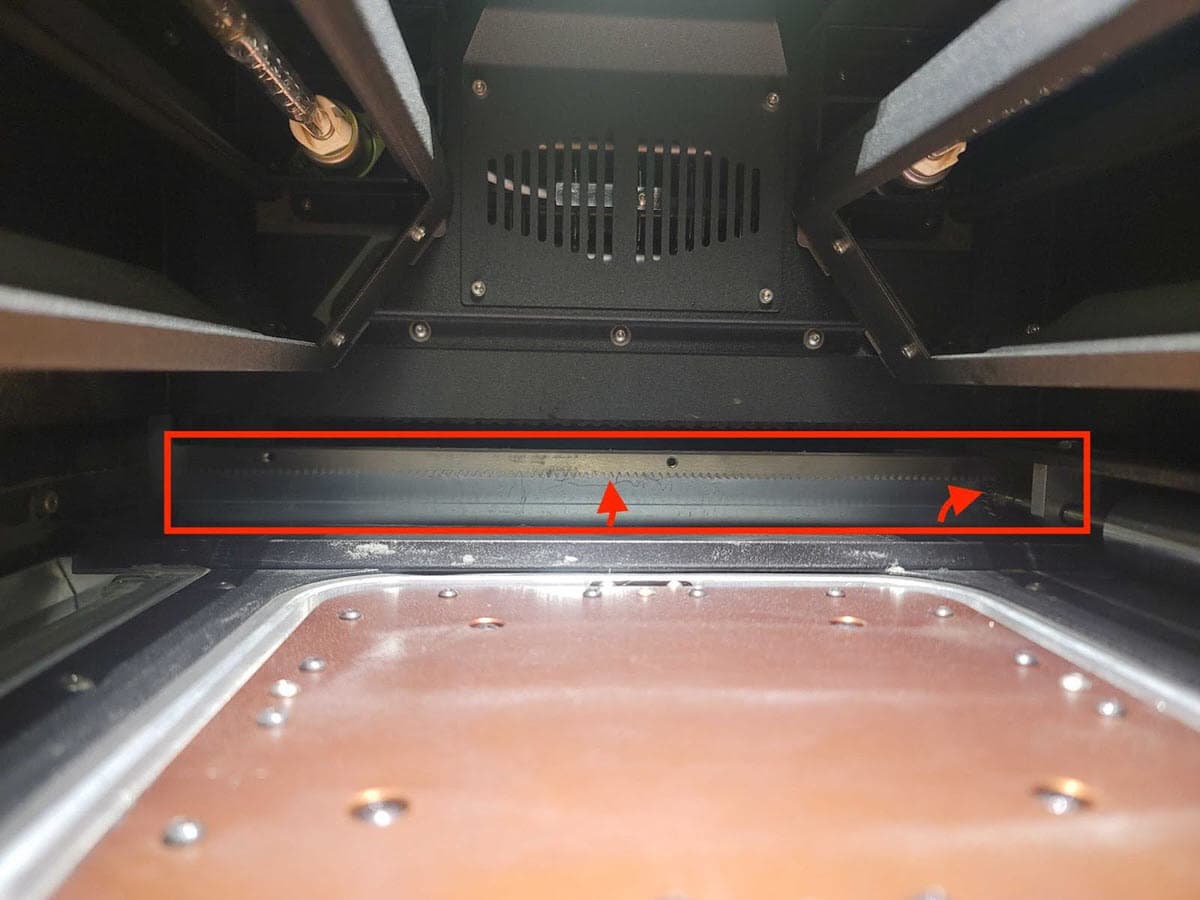
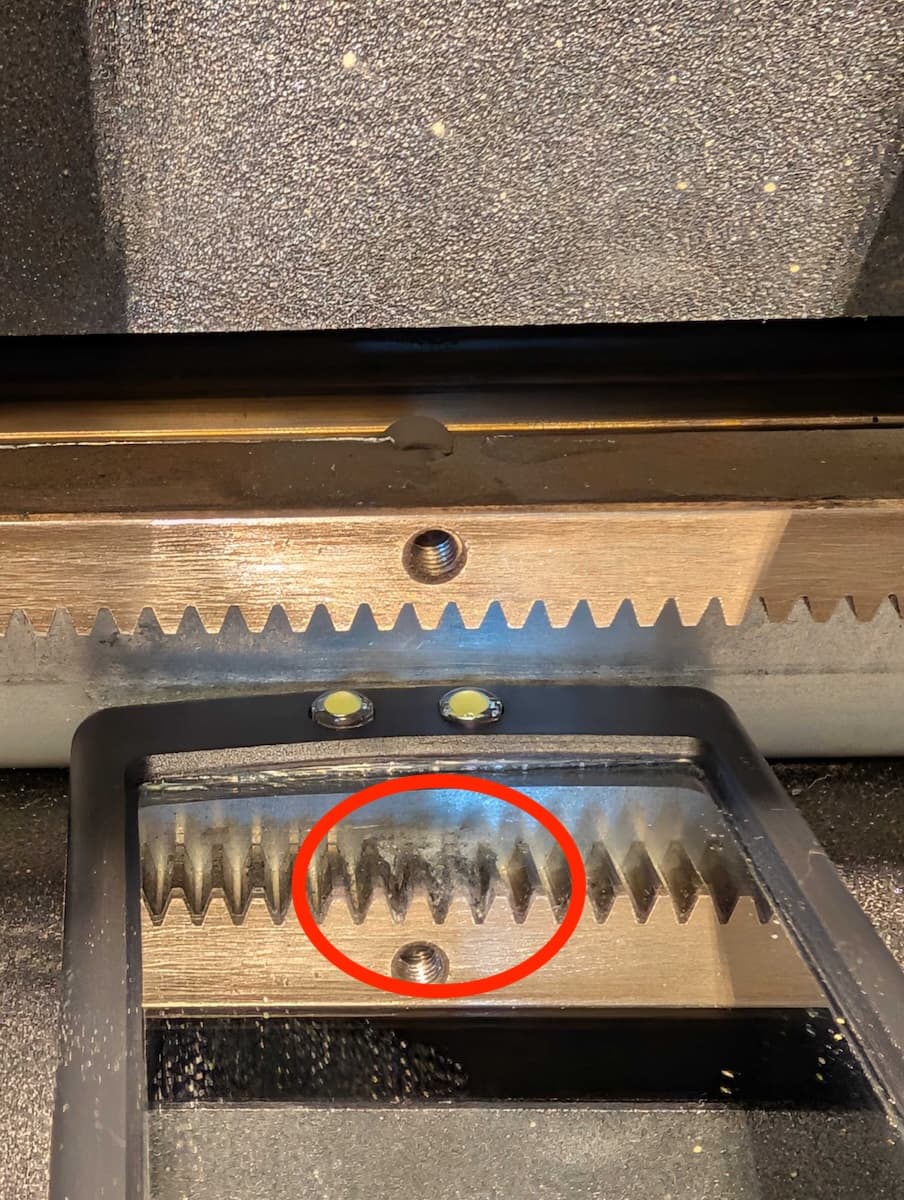
    2. The recoater rack and pinion gears (in the rear of the printer)
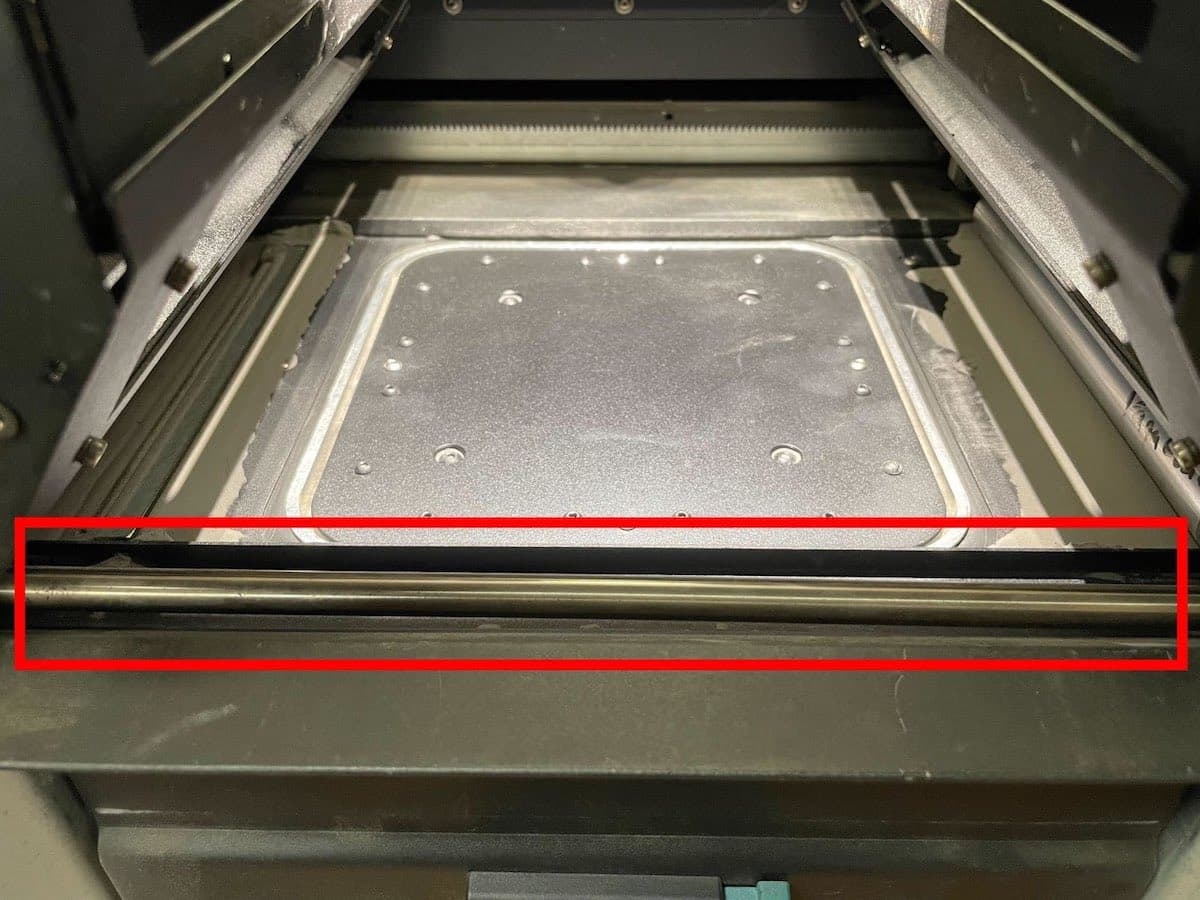
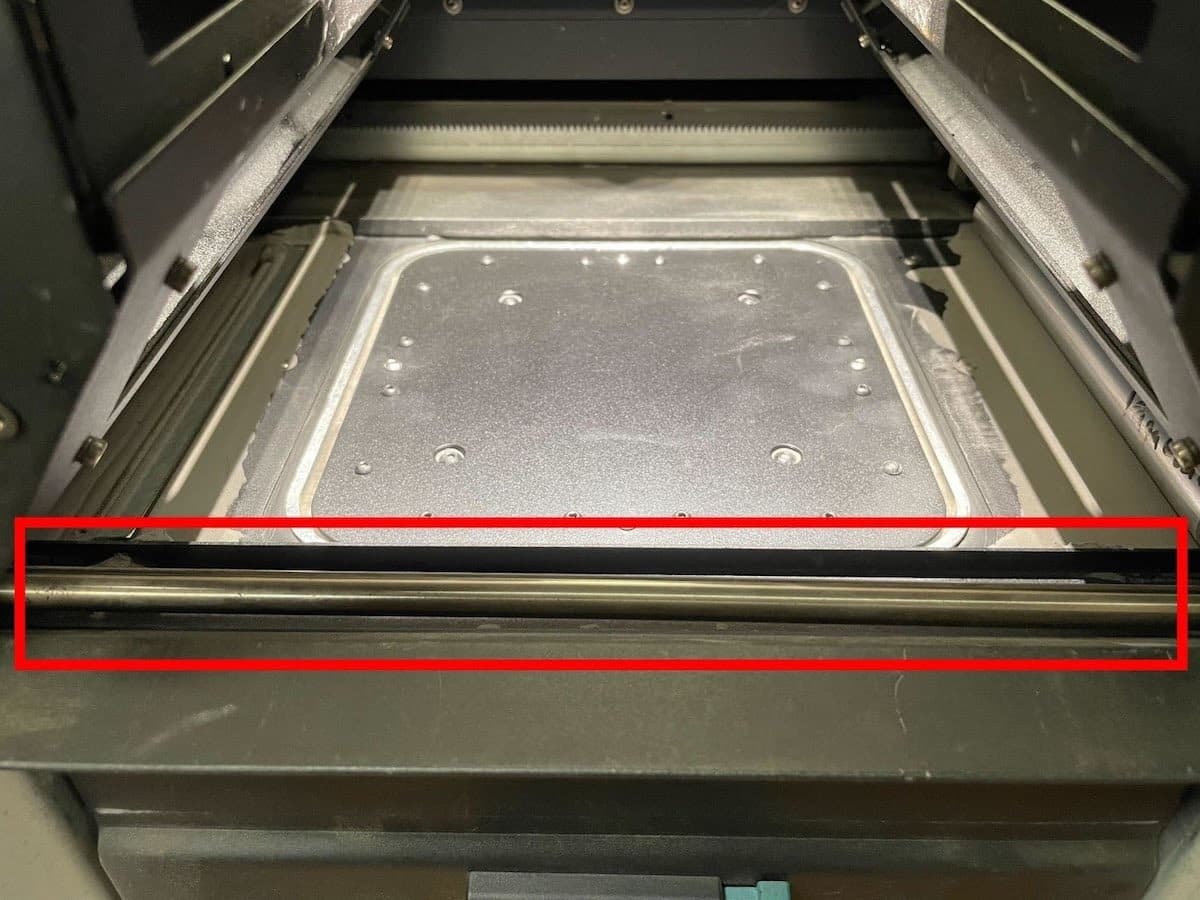
    3. The front linear rails
    4. The build chamber print bed
Fuse 1 代重涂机滚轴齿条齿轮
Fuse 1 代重涂机滚轴齿条齿轮
Fuse 1 代线性导轨
  1. 如果发现任何熔化或受影响的粉末,请清洁受影响的区域。
    1. 在某些情况下,碎屑可能会粘在打印机组件上,导致材料难以清除。在这种情况下,可能需要用热风枪对熔化的粉末进行加热。
      1. 在对粉末槽中的碎屑进行加热之前,用真空装置吸除未烧结的粉末。
      2. 在对 SLS 粉末进行加热时,务必要佩戴呼吸器,并且只能在通风良好的地方尝试。
    2. 熔化或受影响的粉末可能表明存在其他问题。检查打印机的历史记录,查看此错误是否是其他问题的表现。
  2. 如果重涂机似乎与翻转板相撞,则说明翻转板未归位到正确的位置。请参阅解决错误 93/1错误 93/2 的翻转板归位问题的步骤。
  3. 如果没有发现明显的碎屑或障碍物,请尝试使用 Motor Moves(马达动作)菜单移动重涂机。
    1. 拍摄重涂机移动视频,查看是否有任何异常或意外行为。
    2. 使用 Motor Moves(马达动作)菜单驱动重涂机时,如果重涂机意外停止:
      • 仔细检查打印机后部的齿条齿轮是否有受影响的粉末。使用 Fuse Sift 随附的镐清除所有堆积物,彻底清洁每个齿。
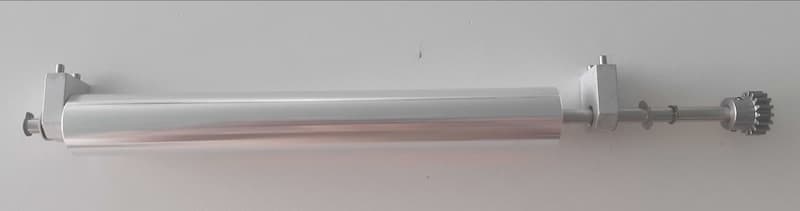
      • 拆卸重涂机滚轴,检查滚轴组件上的小齿轮是否有受影响的粉末。使用镐清除所有堆积物,然后重新安装滚轴。
拆卸 Fuse 1 代重涂机以进行清洁
      1. 用乙醇和防刮擦超细纤维布擦拭前部线性导轨。
Fuse 1 代前部线性导轨
      1. 如果在滚轴组件中未发现任何粉末,或者清洁后问题仍然存在,请尝试在拆卸滚轴的情况下使用 Motor Moves(马达动作)菜单移动重涂机:
        1. 如果问题不再出现,可能需要更换滚轴。可在 Formlabs 商店购买 Fuse 1 代重涂机滚轴。
        2. 如果拆卸滚轴后问题仍然存在,请联系 Formlabs Support认证服务提供商
    1. 如果重涂机移动不稳定,但并未发现障碍物,则可能是编码器板出现故障:
      1. 重新安装马达编码器板。
      2. 更换重涂机马达组件。可在 Formlabs 商店购买 Fuse 1 代重涂机马达。

Error 93/4 PR_ERROR_MOTORS_MOVE_DEVIATION__CYLINDER

Error 93/4 indicates that the Z-drive motor deviated from the expected movement and the print bed was not able to move the expected amount.

Troubleshooting steps

  1. Confirm the printer’s firmware is up to date. If it is not, update the firmware.
  2. Confirm whether the issue is a printer issue or if the issue is specific to one build chamber.
    1. Test the affected build chamber in the Fuse Sift. If the issue occurs on both the printer and Fuse Sift, the problem is likely with the build chamber. Proceed to step 2.
    2. Try another build chamber in the printer, if one is available. If the issue occurs persistently with both build chambers, it is likely specific to that printer. Proceed to step 3.
    3. If the issue is inconsistent, or the affected hardware cannot be isolated, contact Formlabs Support or a certified service provider for assistance.
  3. If the issue is specific to one build chamber:
    1. Remove the print bed and vacuum the felt seal.
      1. If debris cannot be removed or the felt seal is visibly damaged, replace the print bed assembly. Follow the steps in Replacing the Fuse 1 generation build chamber print bed [EN] [DE] [ES] [FR] [IT] [JA] [ZH].
    2. Inspect the edge of the print bed and the build chamber walls for melted plastic powder. Remove any melted debris.
      1. It may be necessary to remove or replace the build chamber print bed to clean melted powder around the perimeter of the build chamber.
      2. If you cannot remove the melted powder, replace the build chamber. Melted powder around the print bed is often a symptom of another issue. Refer to the steps for troubleshooting perimeter melting for next steps.
    3. Optional: To reduce friction within the build chamber and prolong the life of its Z-axis components, clean, and lubricate the build chamber lead screw. Follow the steps in Cleaning and lubricating the build chamber lead screw [EN] [DE] [ES] [FR] [IT] [JA] [ZH].
  4. If the issue is specific to the printer, there may be an issue with the printer’s Z-drive assembly or motor.
    1. Remove the build chamber from the printer and use the Motor Moves menu to move the Z-drive bevel gear.
      1. If the printer’s Z-drive does not move at all, the encoder board may have failed.
        1. Reseat the Z-drive encoder board cable.
        2. If reseating does not help, you may need to replace the Z-drive motor assembly. The assembly is available for purchase on the Formlabs Store.
      2. If the Z-drive motor moves intermittently or erratically, replace the Z-drive motor assembly. The assembly is available for purchase on the Formlabs Store.

Error 93/5 PR_ERROR_MOTORS_MOVE_DEVIATION__DOSER

Error 93/5 indicates that the doser motor deviated from the expected movement and the doser was not able to move the expected amount.

Troubleshooting steps

Confirm the printer’s firmware is up to date. If it is not, update the firmware.

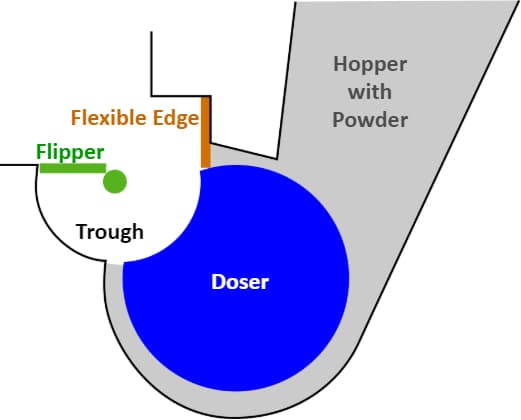
It can be challenging to observe the doser’s movement while the printer is full of powder. For cases that need detailed inspection of the doser assembly and doser motion, it may be necessary to empty the hopper and hopper trough area, if possible.

Fuse 1 代打印机的料斗、给料器和翻转板组件示意图

使用 Motor Moves(马达动作)菜单来驱动给料器和料斗侧翻转板,并评估其运动。录制视频。

  1. 将料斗侧翻转板移出给料器滚轴的移动范围。将其移动到或接近其原位效果更好。
  2. 将给料器辊筒旋转数圈。
  3. 如果给料器辊筒在到达原位之前停止,请在此时仔细检查。
  4. 使用 Motor Moves(马达动作)菜单驱动给料器时,如果给料器意外停止:
    1. 仔细查看该区域周围是否有物体干扰给料器辊筒。特别注意辊筒或粉末槽上是否粘有熔化的粉末或碎屑。
  5. 如果给料器辊筒可充分旋转,但没有回到正确的原位(如上图显示):
    1. 确认辊筒是否每次都回到相同的原位。
      1. 如是,则重新校准给料组件。如需重新校准给料器,点击打印机触摸屏上的 Settings(设置)> Calibration(校准)> Doser calibration(给料器校准)。请遵循屏幕上的说明进行操作。
      2. 如果没有,则编码器板可能出现故障。重新安装给料器编码器板。
      3. 如果重新更换给料器编码器板仍不能解决问题,则可能需要更换给料组件。可在 Formlabs 商店购买 Fuse 1Fuse 1+ 30W 给料组件。安装替代件后,重新校准给料组件。
  6. 如果给料器辊筒正常旋转并归位至正确位置,则评估料斗翻转板的运动情况。
    1. 在移动料斗翻转板之前,确保给料器辊筒处于原位。
    2. 将料斗翻转板旋转数圈。
      1. 如果翻转板始终停在同一个错误原位,请联系 Formlabs Support认证服务提供商,获取帮助以重新校准翻转板。
      2. 如果翻转板停在错误的位置,但不是每次都停在同一位置,或者移动不稳定,则可能是编码器板损坏。
        1. 重新安装翻转马达编码器板电缆。
        2. 如果重新更换电缆仍不能解决问题,则可能需要更换缓冲器翻转板马达组件。可在 Formlabs 商店购买 Fuse 1 代翻转板马达。
  7. 如果给料器移动不稳定,但没有看到障碍物,则可能是编码器板出现故障或传动系统的某个组件打滑。
    1. 重新安装给料器马达编码器板电缆。
    2. 如果重新更换给料器编码器板仍不能解决问题,则可能需要更换给料组件。可在 Formlabs 商店购买 Fuse 1Fuse 1+ 30W 给料组件。
  8. 如果执行上述步骤后仍未确定故障处,请联系 Formlabs Support认证服务提供商。随附翻转板和给料器移动的视频。

Error 94/3–4 PR_ERROR_MOTORS_MOVE_​MISSED_HARDSTOP

每次打印开始时,打印机都会校准重涂机和打印床的原位,方法是将每个组件移动到其移动范围的结束位置,即急停点。打印机通过监测马达的电流来检测急停点;当电流达到特定的阈值时,表明组件已与急停点相撞,从而将其确定为整个打印的原位。

错误 94 表示马达旋转过长时间,而组件没有达到急停点。当部件传动系统的某处出现故障,导致马达的旋转不能转化为部件的运动时,就会出现这种情况。

表现

  • 打印前或打印过程中出现错误代码
  • 组件移动时发出吱吱嘎嘎/滴答声

原因

错误 94/3错误 94/4
  • 重涂机马达损坏
  • 成型室 Z 轴驱动器组件损坏
  • Z 轴驱动器马达损坏

Troubleshooting steps

  1. Confirm the printer’s firmware is up to date. If it is not, update the firmware.
  2. Replace the affected motor assembly. Fuse 1 generation motor assemblies are available for purchase on the Formlabs Store.
  3. If the issue persists after the motor has been replaced, contact Formlabs Support or a certified service provider.

Error 95/1–5 PR_ERROR_MOTOR_MOTOR_MOVE_MISSED_INDEX

在马达正常运行过程中,会出现微小的偏差,导致组件的实际位置与预定位置之间存在细微差别。对于给料器和翻转板等有固定原位的组件,打印机会定期通过重新定位组件来纠正这些偏差。这些重新定位的行为称为索引移动。索引移动有意命令马达的移动量略微超出原位,一旦编码器板确认马达已到达原位,则停止移动。

错误 95 表示马达在索引移动过程中移动了全部指令距离,但编码器板未检测到已到达原位。

表现

  • 打印前或打印过程中出现错误代码

原因

  • 与组件编码器板的连接不良
  • 组件校准原位漂移
  • 微小偏差(低于错误 93 的阈值)导致组件在稍后点错过其索引位置

故障排查步骤

错误 95/1–5 可按照与错误 93 相同的故障排查步骤进行解决。注:编码器板问题导致错误 95 的可能性大于错误 93

马达出现意外动作或发出异常声音,但未显示错误信息

大多数导致异常声音的意外马达动作或行为,最终都会导致上述错误信息之一。如果发现马达出现新的或异常动作,但打印机未报告任何错误,请确定受影响的马达,并按照上述相应错误信息的相关故障排查步骤进行操作。